Node.js Questions
Here are some of the most common and high-impact questions you might encounter in your interviews. These key questions frequently start conversations and are favorites among interviewers. Prepare well, and you'll be ready to impress!
Table of Contents
- What is Node.js?
- How does Node.js handle errors in asynchronous code?
- Event-Driven, Non-Blocking I/O in Node.js
- package.json vs package-lock.json
What is Node.js?
Node.js is a JavaScript runtime built on Chrome's V8 engine, allowing developers to run JavaScript code outside of a browser. It's designed for building scalable and efficient network applications.
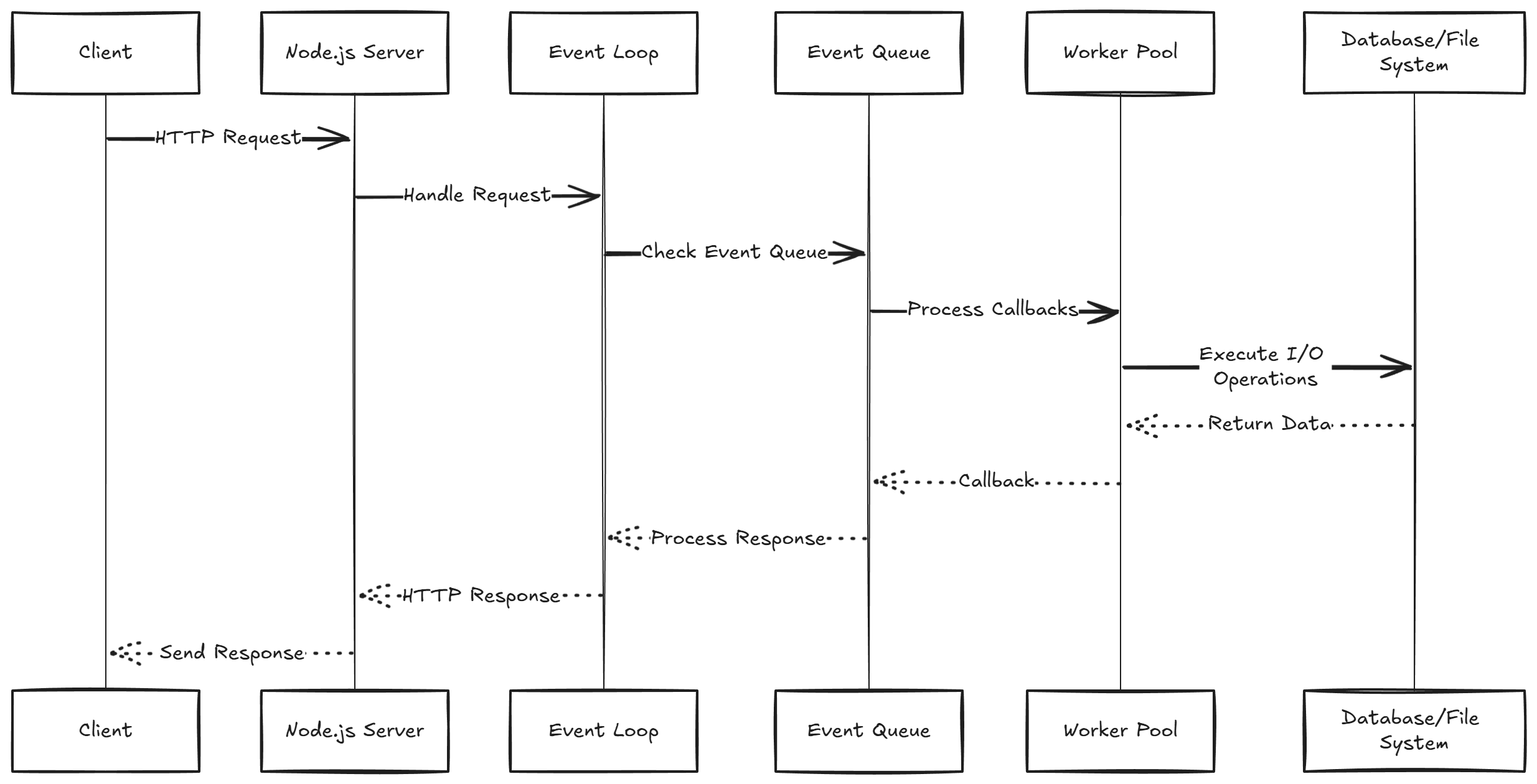
Node.js Architecture Overview
Request Flow:
- Clients send requests to the Node.js server.
- Requests are stored in the Event Queue using a First-Come, First-Served (FCFS) method.
Event Loop:
- Processes requests from the Event Queue.
- Differentiates between blocking and non-blocking requests.
Request Types
Non-Blocking Requests:
- Executed asynchronously; the program continues without waiting.
- The Event Loop handles these requests quickly, allowing other operations to proceed.
Blocking Requests:
- Executed synchronously; the program pauses until completion.
- A thread processes the request, and responses are sent back to clients.
- Default thread pool size is 4 (can increase based on CPU cores).
Challenges with Blocking Requests:
- Increased client load can exhaust limited threads, causing delays.
- Prefer non-blocking requests to avoid user wait times and improve experience.
Recommendation:
- Aim to make most requests non-blocking to enhance application scalability and user experience.
How does Node.js handle errors in asynchronous code?
In Node.js, error handling in asynchronous code is critical due to its event-driven, non-blocking nature. The primary methods include:
- Callbacks: An error-first callback pattern, where the first argument is reserved for an error and the second for the result.
- Promises: A cleaner approach using
.then()and.catch()for error handling. - Async/Await: Built on Promises, allowing for a more readable syntax using try/catch block for error handling.
function asyncOperation(callback) {
    setTimeout(() => {
        const error = null; // or new Error("Something went wrong");
        const result = "Success";
        callback(error, result);
    }, 1000);
}

asyncOperation((error, result) => {
    if (error) {
        console.error("Error:", error);
    } else {
        console.log("Result:", result);
    }
});function asyncOperation() {
return new Promise((resolve, reject) => {
setTimeout(() => {
const error = null; // or new Error("Something went wrong");
const result = "Success";
if (error) reject(error);
else resolve(result);
}, 1000);
});
}
asyncOperation()
.then(result => console.log("Result:", result))
.catch(error => console.error("Error:", error));async function asyncOperation() {
return new Promise((resolve, reject) => {
setTimeout(() => {
const error = null; // or new Error("Something went wrong");
const result = "Success";
if (error) reject(error);
else resolve(result);
}, 1000);
});
}
async function execute() {
try {
const result = await asyncOperation();
console.log("Result:", result);
} catch (error) {
console.error("Error:", error);
}
}
execute();Event-Driven, Non-Blocking I/O in Node.js
Node.js uses an event-driven, non-blocking I/O model that makes it lightweight and efficient for building scalable applications. Here's how it works:
1. Event-Driven Model
- Node.js operates on an event loop. When a request is made (like reading a file or querying a database), it's processed in an asynchronous manner.
- Instead of waiting for the request to complete, Node.js listens for events and handles them when they occur, allowing other tasks to proceed.
2. Non-Blocking I/O
- Non-blocking I/O means operations (e.g., reading a file) don't stop the execution of other code. Node.js will continue running other tasks while waiting for I/O to finish.
- This model avoids the traditional thread-based approach of handling concurrent connections, where each thread would block waiting for an operation to complete.
const fs = require('fs');

fs.readFile('example.txt', 'utf8', (err, data) => {
  if (err) throw err;
  console.log(data);
});

console.log('Reading file...');
package.json vs package-lock.json
package.json
Purpose:
- Central configuration file for Node.js projects.
- Describes project metadata, dependencies, and scripts to facilitate development and deployment.
- Helps npm (Node Package Manager) manage the installation of the project and its dependencies.
Key Features:
- Project Info: Includes name, version, description, and entry point (e.g.,
index.js). - Dependencies: Lists libraries required for production (
dependencies) and development (devDependencies). - Scripts: Defines executable commands for tasks (e.g.,
npm start,npm test).
- Project Info: Includes name, version, description, and entry point (e.g.,
package-lock.json
Purpose:
- Automatically generated file that locks the specific versions of all installed packages and their dependencies.
- Ensures consistent package versions across different environments, preventing "works on my machine" issues.
- Facilitates faster installations by using cached versions and avoiding unnecessary updates.
Key Features:
- Exact Versions: Records the exact version of each package.
- Dependency Tree: Includes a detailed tree of all dependencies, including nested ones.
- Integrity Hashes: Contains hashes to verify the integrity of packages during installation.